
Blossive vs Google Ads
Blossive runs your YouTube ads on Google Ads — without the ad account, the Ads Manager or the learning curve. Our AI sets up each campaign and our team checks it before launch.
You Keep Google Ads. We Do the Setup.
It's not about which one is better — Blossive runs on Google Ads. It's about who does the setup, and how long it takes you.
No Google Ads account
Campaigns run in Blossive's own Google Ads account. You sign in with Google and pick a video — no ad account, no billing profile, no channel linking.
No Ads Manager to learn
No campaign types, bidding strategies or budget pacing to figure out. Choose your goal and budget on one screen — about 3 minutes.
AI setup, human check
Blossive's AI builds the campaign and picks the targeting for your video. Our moderation team checks and confirms every campaign before it launches.
What Each Route Asks of You
Running a YouTube ad on your own in Google Ads, step by step — and the same steps with Blossive.
| Step | On your own in Google Ads | With Blossive |
|---|---|---|
| Getting started | Create a Google Ads account, add billing, link your YouTube channel (Owner or Manager access; syncing can take up to 24 hours)Create a Google Ads account, add billing, link your YouTube channel (Owner or Manager access; syncing can take up to 24 hours) | Sign in with Google and pick your videoSign in with Google and pick your video |
| Building the campaign | Choose an objective, campaign type, bidding strategy, budget and ad formats yourselfChoose an objective, campaign type, bidding strategy, budget and ad formats yourself | Choose your goal (views, subscribers or clicks) and budget — Blossive's AI builds the restChoose your goal (views, subscribers or clicks) and budget — Blossive's AI builds the rest |
| Choosing the audience | Research and assemble audiences, demographics and locations yourselfResearch and assemble audiences, demographics and locations yourself | AI picks the targeting for your video; you can fine-tune itAI picks the targeting for your video; you can fine-tune it |
| Writing the ad | Write headlines and descriptions yourselfWrite headlines and descriptions yourself | AI writes the ad textAI writes the ad text |
| Before launch | Google reviews the ad (usually 24–48 hours)Google reviews the ad (usually 24–48 hours) | Our moderators check the campaign, then Google reviews the ad as usualOur moderators check the campaign, then Google reviews the ad as usual |
| Reading the results | Build your own reports in Google AdsBuild your own reports in Google Ads | Views, clicks and spend in your Blossive dashboard — plus your YouTube StudioViews, clicks and spend in your Blossive dashboard — plus your YouTube Studio |
| Every new upload | Set up a new campaign each timeSet up a new campaign each time | Autopilot launches a campaign for each new videoAutopilot launches a campaign for each new video |
Google Ads details as of October 2026, from Google Ads Help — see sources below.
How Blossive Works
From video to running YouTube ad, without opening Google Ads.
- 01
Pick your video
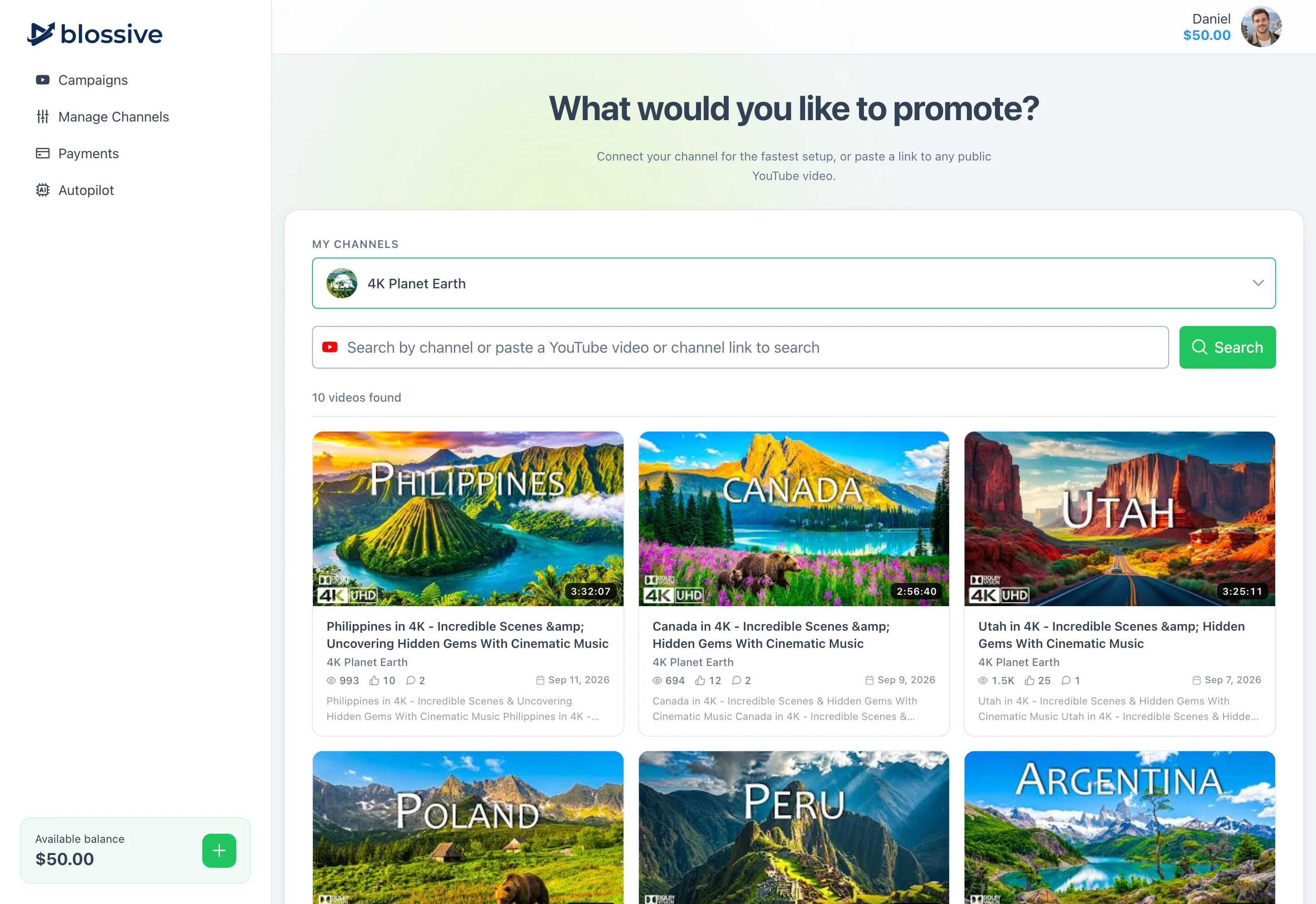
Sign in with Google, connect your channel and choose the video or Short you want to promote — or paste any YouTube link.
Blossive campaign start screen: pick a video from your connected YouTube channel or paste a link - 02
Choose your goal and budget
Views, subscribers or clicks to your site. Blossive's AI writes the ad text and picks the targeting — fine-tune it if you like.
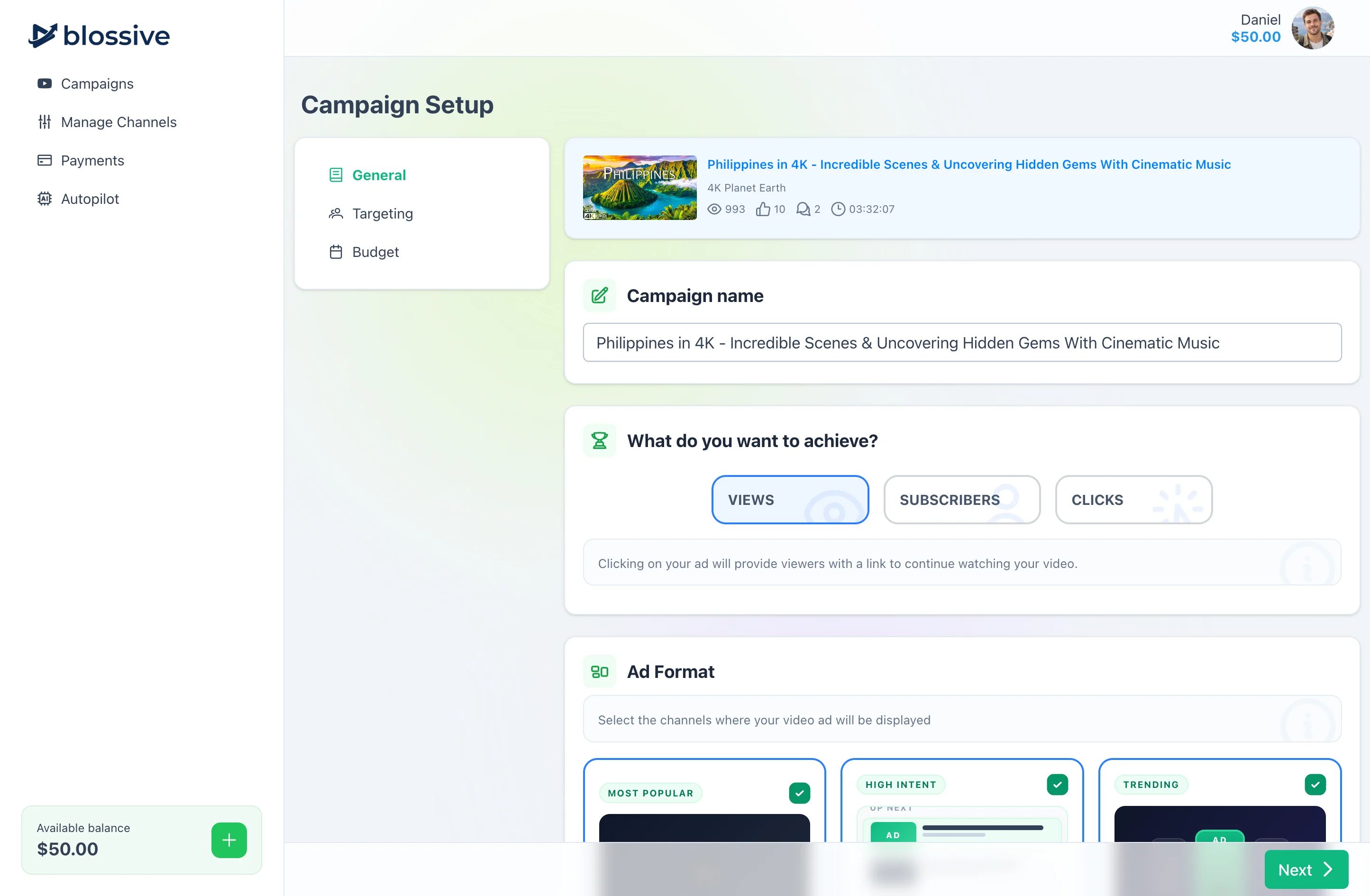
Choosing the campaign goal and ad formats in Blossive 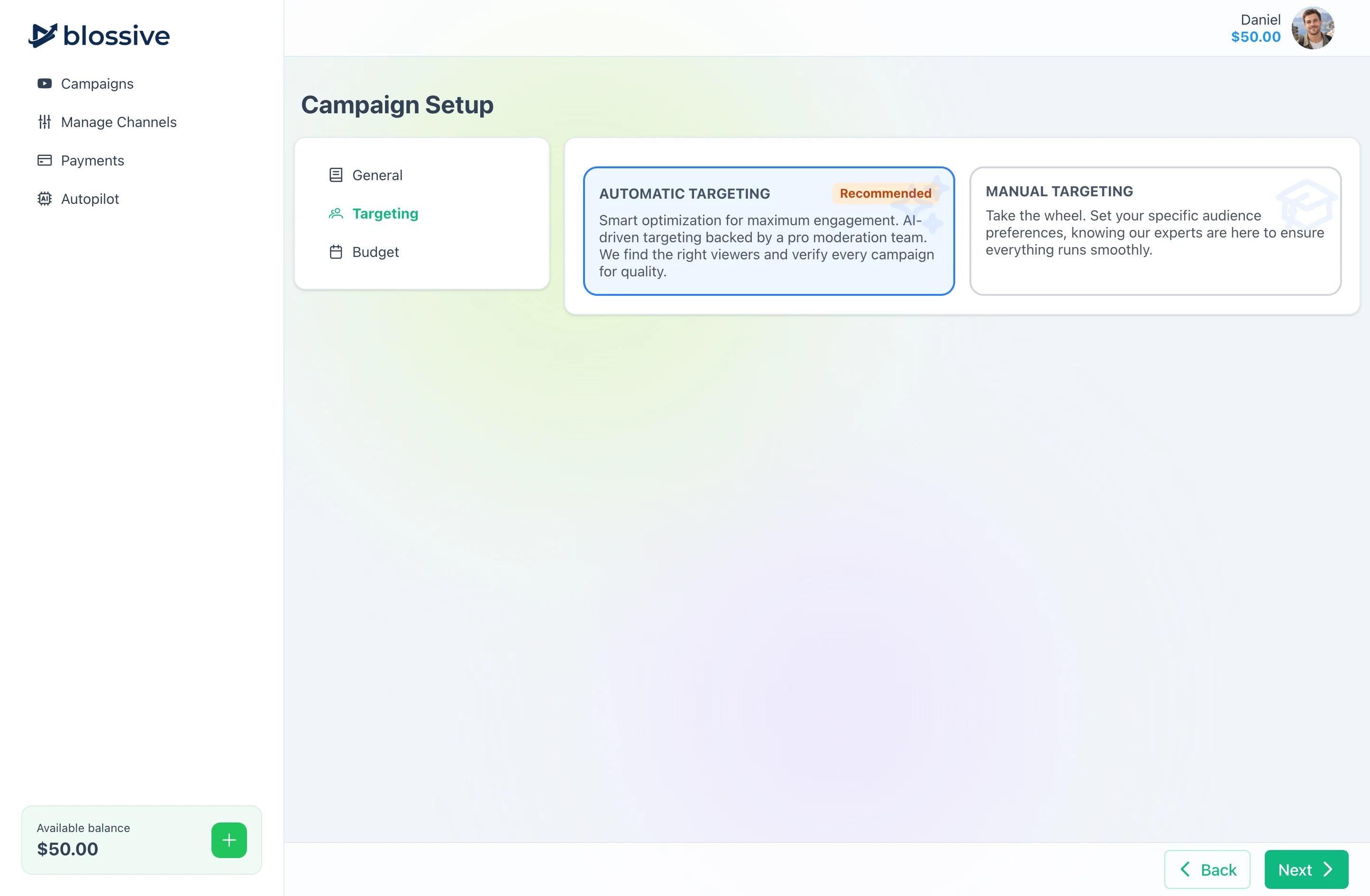
Targeting suggested for the video, ready to adjust - 03
We check it, Google runs it
Our moderation team checks the campaign, Google reviews the ad, and your video runs as a real YouTube ad. Follow the results in Blossive and YouTube Studio.
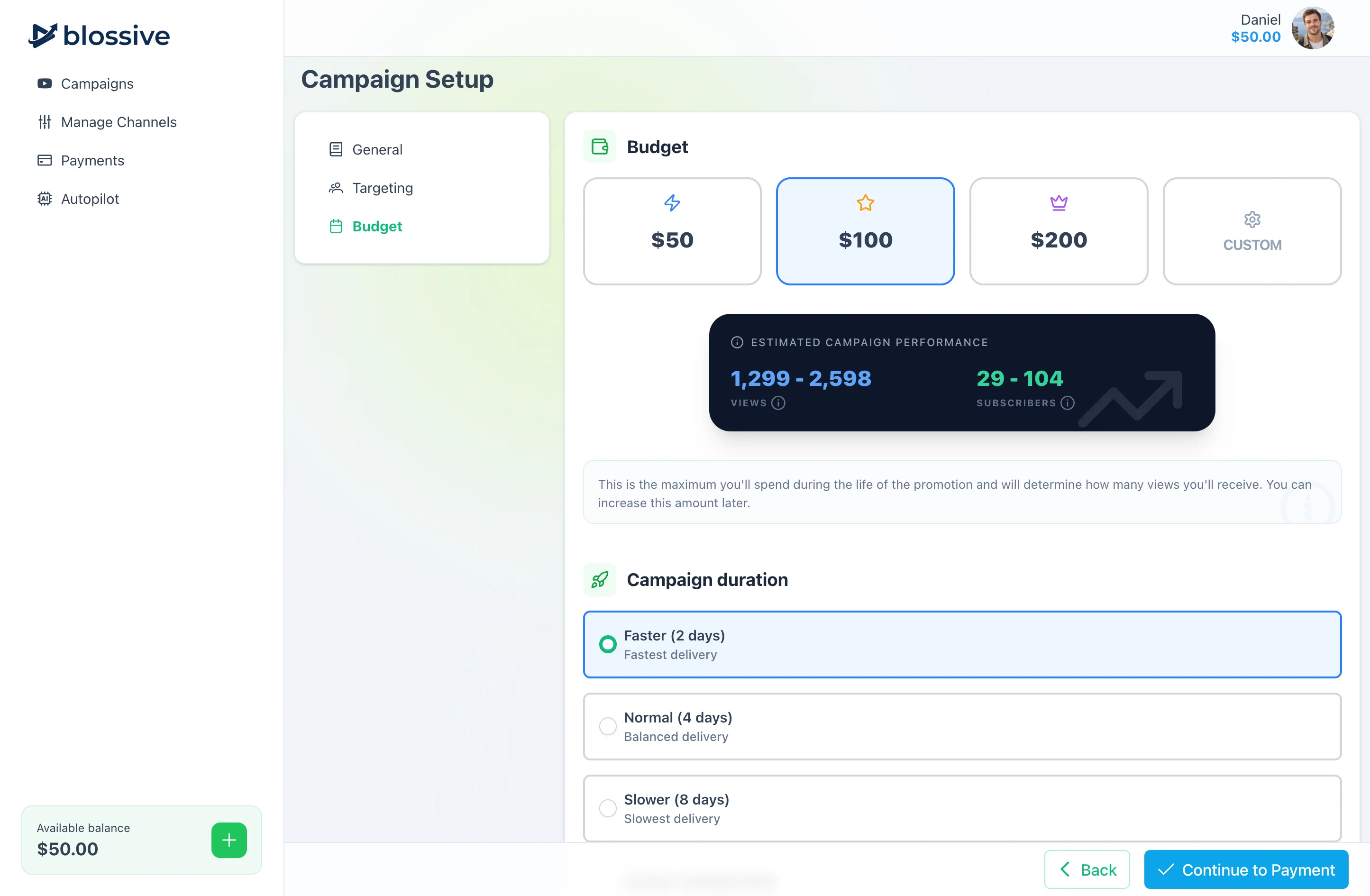
Setting the campaign budget before launch
Pick the Right Route
Both run real YouTube ads. They're built for different people.
Choose Blossive if you…
- Want to promote your videos without learning Google Ads
- Don't want to set up an ad account, billing and channel linking
- Want AI to pick the targeting and a team to check it before launch
- Want every new upload promoted automatically with Autopilot
Choose Google Ads if you…
- Want full control over bidding, audiences and reporting
- Need conversion tracking for sales or leads on your website
- Advertise beyond YouTube — Search, Display and more
- Have the time (or a specialist) to set up and manage campaigns
Real Google Ads, Checked by People
Nothing about the ads themselves changes — only who sets them up.
The same Google Ads network
Your video runs as a real YouTube ad through Google Ads — the same ads, the same placements, the same Google ad review.
Results in your YouTube Studio
Views from the campaign show up in your own YouTube Studio, not just in our dashboard.
Checked before every launch
Every campaign is reviewed by our moderation team before it goes live — on top of Google's own ad review.
Frequently Asked Questions
Common questions about Blossive and Google Ads.
Blossive campaigns run on Google Ads. The difference is who does the work: in Google Ads you set up and manage the campaign yourself, with Blossive our AI builds it and our team checks it before launch.
No. Campaigns run in Blossive's own Google Ads account. You sign in with Google and connect your YouTube channel — no ad account or Google billing setup needed.
Blossive's AI does the initial setup and picks the targeting for your video. Our moderation team then checks and confirms every campaign before it launches. You can fine-tune the targeting yourself if you want to.
Setting up a campaign takes about 3 minutes. Most campaigns start within 24–48 hours, after payment and the ad network's review.
From $50 per campaign. You pay once per campaign — no subscription and no Google Ads account to fund.
Yes. Google Ads is the better fit if you want full control over bidding, audiences and reporting, or advertise beyond YouTube. Blossive is for creators who want to promote their videos without learning the platform.
Yes, with Autopilot: connect your channel once, set your targeting and budget, and Autopilot launches a campaign for each new upload.
No. Blossive is an independent service that manages campaigns on the Google Ads network through the Google Ads API.
Want to go deeper?
See how to promote YouTube video views with Blossive, auto-promote every new video with Autopilot, or read our guide on how to promote YouTube videos .
Google Ads sources (October 2026): Link YouTube channels and Google Ads accounts · Create a Video campaign · About the ad review process
Promote Your Next Video Without Google Ads
Pick a video, choose your goal and budget — our AI sets up the campaign and our team checks it before launch.
No Google Ads account needed. Pay once per campaign.